What it is
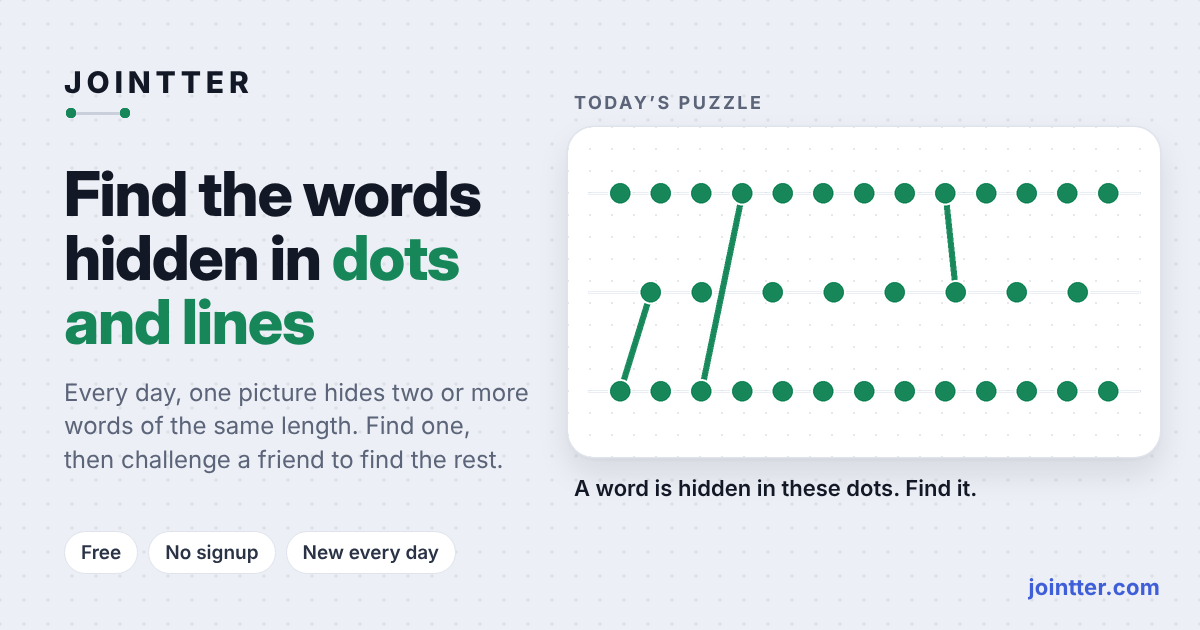
Jointter is a browser-based daily word puzzle inspired by Wordle. Letters are represented as diagrams made of dots and lines, and each day hides a 7-letter target word among them. Puzzles get harder from Monday to Sunday, and you solve them by reconstructing the word from letter tiles.
From the developer
In the developer’s own words, from jointter.com.
Hello everyone. I’m a mathematician by training, and I love mathematical and logical puzzles and brain-teasers. Inspired by popular games like Sudoku and Wordle, I decided to come up with an engaging game of my own. As it turns out, that’s not so easy! I had a few ideas, but beyond the core mechanics, a game also needs to be interesting and easy to explain — after all, nobody (including me) wants to spend a long time reading through rules. Let’s start with the concept, which came to me quite spontaneously: what if we represented letters like the digits on a digital clock — using lines, with dots at the points where those lines intersect? For instance, the letter "E" would consist of four lines and six dots — three at the intersections and three at the ends of the lines. It turns out that every letter of the Latin alphabet can be represented this way (with a minor caveat) using three rows of dots connected by some lines. This immediately presented a challenge: how do you represent O-shaped parts, like those found in "B", "O", or "R"? I decided not to use O-shapes, an use onl rectangles/squares. This "alphabet" is always displayed below the game board, so the player can see the letters. The goal of the game is simple: you are presented with three rows of dots and a set of lines, and you have to figure out the word. A great feature of the game is that it’s possible to deduce the word in a single turn — all the necessary information is right there on the board, allowing you to arrive at the answer with certainty. And what if you can’t figure it out on the first try? You can enter a guess, much like in Wordle: if the lines from the entered word are part of the target word, they turn green; if not, they turn red. The same applies to the dots. As you play, more and more lines gradually appear... Why provide some lines at the start? To uniquely identify a specific word — or a small set of words — from the dictionary. For example, you could select a configuration of lines that corresponds to only one word, like "RADIO", or perhaps to just two possible words, such as "WEIGH" and "WRONG". The rules seem clear, but the mechanics — not so much. There are dots on the board; when I enter a word, I realize there aren't enough dots. What should I do? Initially, if the target word had 5 letters, I allowed users to enter 4- or 5-letter guesses, but that just confused players. So, I came up with a different solution: adding red dots for dots that aren't part of the target word. Another drawback is that the game is somewhat skewed. Since letters are processed from left to right, the first letters are revealed more frequently than the last ones. Then there’s the game design itself: should the target words be 5 letters long, or 6? Should a single board allow for multiple possible answers (like "WEIGH" and "WRONG"), or should it be limited to one — or perhaps more than two? Should the difficulty increase from Monday to Sunday? Currently, it’s set up this way: Monday is the easiest (a few 3-letter words), while Sunday is the hardest (more than two 7-letter words). The tech stack is simple: I use Flask for the backend and Python for the algorithms; I wrote the algorithms myself. While the JS, HTML, and CSS were created with the help of AI. I’d love for you to test the game and share what you like, what you don’t, and what could be improved. Specifically, I’d like to know: 1. Is the game and its goal clear? 2. Is it fun to play, and what could be improved? 3. Would you share it with your friends? I welcome any constructive criticism. You can find the game at https://www.jointter.com/ It’s free and requires no registration. Thank you very much.
Editor takes

“Perfect for a coffee-break brain stretch: tap letters, submit, and it's all over before your drink gets cold — the daily reset means no save scumming needed.”

“Five attempts, green-line feedback, and a rule set you can explain in one breath — the logic is legible, even if the draggable dots are a charmingly useless red herring.”

“Taking a single visual conceit — letters as dots and lines — and spinning it into a daily word puzzle is textbook jam-scope economy, with Saturday's difficulty ramp as the polish touch.”

“There's no story or character, but the calm dot-and-line grid gives the daily ritual a quiet, almost architectural poetry — like solving a haiku made of geometry.”
How to play
Select letters from the tile row to spell a 7-letter word, then press Submit. Lines in your submitted word that are part of the target word turn green, and the target word uses every green dot and green line on the board. You have five attempts; dragging dots only tidies the picture and never changes the word.
Tips
- Start with a guess using common vowels and consonants to get useful green feedback early.
- Pay attention to which lines turn green — they show which parts of your guess match the target word.
- Don't spend time rearranging the dots unless the diagram is hard to read, since it doesn't affect the answer.
- Think of each letter as a small shape made of dots and lines when deciding which letters could still fit.
- Use all five attempts and build each new guess from the green lines confirmed so far.
Questions
How many attempts do I get per puzzle?
The site gives you five attempts for each daily puzzle.
What do the green lines mean?
Green lines mark the parts of your submitted word that are also part of the target word.
Does dragging the dots change the puzzle?
No. Dragging dots only tidies the picture and never changes the word.
Is there a new puzzle every day?
Yes, the game uses numbered daily puzzles, such as Jointter #61, with difficulty increasing from Monday to Sunday.
Can I play Jointter on a phone?
The site's instructions say to tap letters, so it works in a mobile browser as well as on a desktop browser.


Comments 0
Log in to comment
No comments yet. Share a tip, a bug or your best moment.